Chrome extension. Student Free is live on the Web Store.

Block distractions.
Finish strong.

Timivra website blockers help students and teams stay off the sites that steal focus. Start with Student Free: personal blocklist, study sprints, and long exam blocks, free for everyone.

Built by the team behind Timivra. Strength that grows with time.

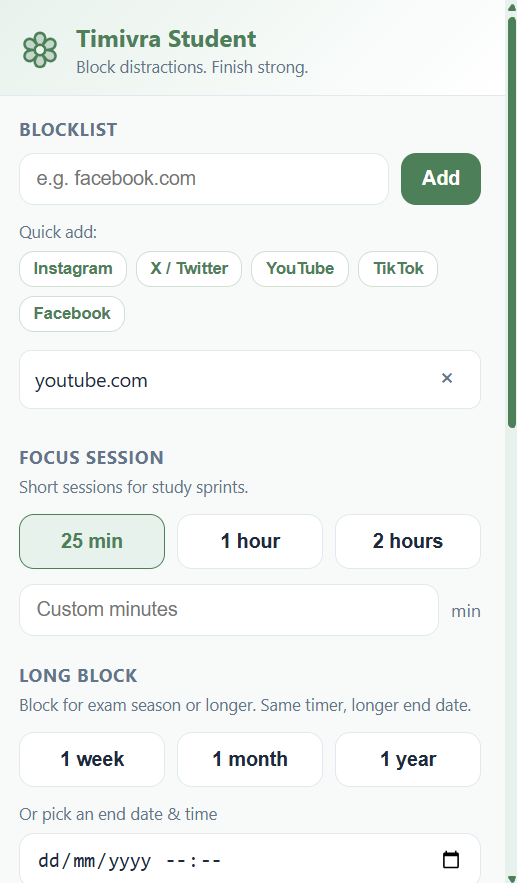
Timivra Student Free extension popup showing blocklist, focus session presets, and long block options
Timivra Student Free, current extension UI

Four blockers. Clear access rules.

Free blockers are free for everyone. Pro blockers are included with the matching Timivra plan, not sold as separate store apps for the public.

Included with Student Pro

Student Pro blocker

Deeper focus tools for paid Timivra Student Pro members.

  • Everything in Student Free, plus Pro focus tools
  • Tied to your Timivra Student Pro account
  • Built for serious study seasons

Access: Free only for Timivra Student Pro users

See Student Pro

Free for everyone

Business Free

Lightweight company blocker for teams getting started.

  • Shared distraction blocking for work
  • Simple setup for small teams
  • No paid Timivra Business plan required

Access: Free for everyone

Business install

Included with Business

Business Pro blocker

Organization-managed blocker with admin visibility.

  • Org code signup + device IDs
  • Work-hour policy + shared blocklist
  • Heartbeat check-ins + admin device list
  • Transparent company-managed notice

Access: Free only for Timivra Business Standard and Premium

See Timivra Business

Student Free features

What you get in the Timivra Student Free Chrome extension, free on the Chrome Web Store for students and workers.

📋

Personal blocklist

Add any domain, or quick-add Instagram, X / Twitter, YouTube, TikTok, and Facebook in one tap.

Focus sessions

Short study sprints: 25 minutes, 1 hour, 2 hours, or any custom length you type.

📅

Long block

Lock distractions for exam season: 1 week, 1 month, 1 year, or pick an exact end date and time.

🔐

Unlock word

Stopping early requires your unlock word plus a confirmation sentence, so quitting is harder on purpose.

🔒

Locked while active

During a session, editing the blocklist is disabled until time runs out or you unlock.

💚

Motivating blocked page

Open a blocked site and get a calm reminder with your countdown, not a harsh dead end.

🌐

Only your sites

We block only domains you choose. Everything else on the web keeps working normally.

Free for everyone

Student Free and Business Free do not require a Timivra subscription. Pro blockers stay tied to paid plans.

How Student Free works

  1. 1

    Build your blocklist

    Add the sites that pull you off track, or use quick-add for the usual suspects.

  2. 2

    Start a focus or long block

    Pick a short study sprint or a longer exam-season block. Your unlock word protects early exits.

  3. 3

    Stay on task

    Blocked sites redirect to a motivating page. When time ends, access returns automatically.

Business blockers

Business Free is free for everyone. Business Pro is included with Timivra Business Standard and Premium, with org policy, heartbeats, and an admin device list.

🏢

Organization code signup

Employees install the Pro extension, enter your org code, and get a device ID tied to your company.

👁

Transparent by design

Staff acknowledge a clear notice that the extension is company-managed and reports that it is active.

📡

Heartbeat check-ins

While the browser is open, devices check in regularly. Missed check-ins show as Not detected for admins.

🗓

Work-hour policy

Blocking follows your organization's work hours and shared blocklist. Employees cannot edit the policy themselves.

📊

Admin device list

See employee name, last check-in, and Active / Not detected status, without fake uninstall locks.

🌐

Chromium-ready

Built on Manifest V3 for Chrome, Edge, and Brave.

Install Student Free

Live on the Chrome Web Store. One-click install for Chrome.

Free for everyone, students and workers. No Timivra login required.

Add to Chrome
  1. Open the Timivra Student Website Blocker listing
  2. Click Add to Chrome
  3. Confirm the install, then pin the extension
  4. Add your distraction sites and start a focus or long block

Prefer Edge or Brave? Install from the Chrome Web Store in those browsers too (Chromium), or ask us about a dedicated listing later.

Install Business blockers

Business Free: free for everyone. Business Pro: Standard & Premium only.

Pro needs your Timivra Business workspace for org codes, heartbeats, and the admin device list.

  1. Sign in to Timivra Business (Standard or Premium for Pro)
  2. Open chrome://extensionsLoad unpacked (store link coming)
  3. Select the Business Free or Business Pro extension folder
  4. For Pro: enter employee name + org code, then acknowledge the policy notice
  5. Admins manage devices from the Business dashboard